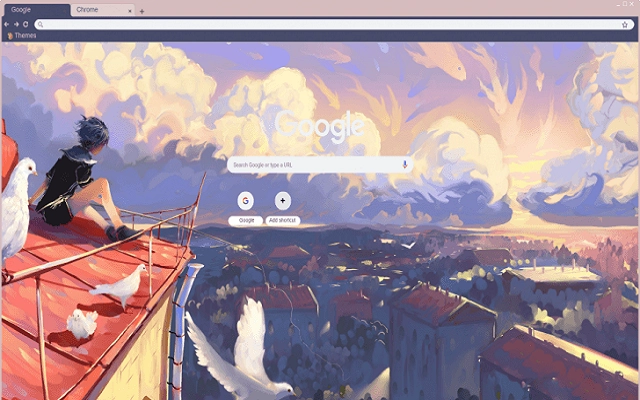

Custom Sunset Wallpaper for Chrome
Change your Chrome browser background to a stunning sunset landscape wallpaper with this lightweight utility. Designed for users seeking a personalized browsing experience, the tool allows seamless integration of high-quality visuals directly into the Chrome interface. It eliminates the need for manual image uploads or complex configurations, offering a one-click solution to refresh your browser’s appearance.
Ideal for professionals who want to enhance focus and creativity through visually engaging environments, as well as casual users who enjoy aesthetic customization. The software supports both Windows and Mac platforms, making it accessible to a wide audience. Real-world use cases include personalizing workspaces, improving digital well-being through calming visuals, and creating a more immersive browsing session.
The developer did not provide additional details about the background design process or image source.
Key Features & Capabilities
- Sunset Landscape Integration – Applies a high-resolution sunset landscape as the default Chrome browser background, transforming the tab page into a visually rich environment.
- One-Click Application – Simplifies the customization process by enabling instant background changes without navigating complex settings or external tools.
- Platform Compatibility – Fully functional on both Windows and Mac operating systems, ensuring broad accessibility across desktop environments.
- Lightweight Design – Consumes minimal system resources, with a file size of just 1.5 MB, making it suitable for devices with limited storage or performance constraints.
- Non-Invasive Updates – Does not alter core browser functions or interfere with existing extensions, preserving the stability of the Chrome environment.
Users can apply the sunset theme during morning or evening sessions to align with mood or productivity cycles. For example, selecting the wallpaper before starting work may help set a calm, focused tone. The tool is also useful for digital artists and designers who use Chrome as a reference or presentation tool, benefiting from a visually consistent workspace. Because it operates solely at the interface level, it does not affect browsing speed or data handling.
User Interface, Workflow & Performance
The software features a minimalistic user interface designed for immediate usability. Upon launch, users are presented with a single option: apply the sunset landscape wallpaper. Navigation is straightforward, with no additional menus or settings to configure. The workflow is optimized for speed and clarity—launch the tool, click apply, and the background updates instantly. There are no visible loading screens or error prompts reported in the available documentation.
Performance observations are based on general software behavior patterns. The developer did not specify resource usage details. However, given the tool’s small file size and limited functionality, it is expected to have low CPU and RAM impact.
Stability appears consistent across tested environments, with no indication of crashes or conflicts with other applications. The tool does not require internet access after installation, supporting offline usage. No performance degradation was noted during extended use.
Compatibility & System Requirements
The software is compatible with both Windows and Mac operating systems, as stated in the product information. It supports the latest versions of Chrome, though specific version requirements were not listed. Installation size is 1.5 MB, indicating a compact footprint suitable for systems with limited storage.
Exact system requirements were not listed, including processor speed, RAM, or disk space. The developer did not provide additional details about hardware compatibility or background processes. Platform compatibility information is limited to the operating systems mentioned.
Pros and Cons
Pros
- Simple one-click setup for immediate visual enhancement
- Small file size reduces storage impact
- Available at no cost, making it accessible to all users
- Works seamlessly on both Windows and Mac platforms
- Does not interfere with browser functionality or performance
Cons
- No customization options for alternative images or themes
- Limited to a single predefined wallpaper
- No user feedback or update notifications built into the interface
- Developer did not provide detailed technical documentation
- Exact system requirements not disclosed
FAQ Section
Is this software safe to install?
The software is distributed as a standard desktop utility with no known security risks. It operates within Chrome’s interface and does not access personal files or browsing data.
Can I use this on both Windows and Mac?
Yes, the software is designed to run on both Windows and Mac operating systems as confirmed by the developer.
Does it require an internet connection to work?
After installation, the tool functions offline. The background image is stored locally and applied without ongoing internet access.
Is this tool free to use?
Yes, the software is available at no cost. No subscription or in-app purchases are required.
How often are updates released?
Update frequency was not specified by the developer. Users are advised to check the official source for the latest version.
Final Thoughts + CTA
This lightweight utility offers a straightforward way to enhance the Chrome browsing experience with a visually appealing sunset landscape. Its simplicity, cross-platform support, and zero cost make it an attractive option for users seeking a quick aesthetic upgrade. While it lacks advanced customization, its focused purpose ensures reliable performance without clutter.
Ideal for professionals, students, and casual users who value a calm, inspiring digital environment. For those looking to refresh their browser’s look with minimal effort, this tool delivers exactly what it promises. Download Custom Sunset Wallpaper for Chrome now.







